Build A Football Team How to Redeem Codes
Tutorial gate, bottom-right CODES button, ALL CAPS, green confirmation.
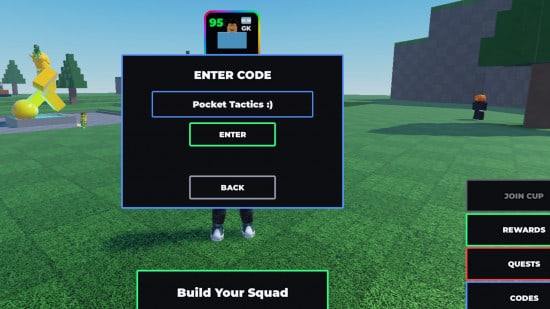
The redeem box in Build A Football Team is small, case-sensitive, and hidden until you finish the intro. Most “code not working” reports are tutorial-gate misses, lowercase paste, or expired strings from launch week. The experience is already live in a 25-player lobby — this page is the tap order, not a pre-release FAQ.
Keep the codes hub open in another tab. Live strings in September 2026 are GOAT, FUTURE, UNIVERSE, CONSOLE, LIMITBREAKER, and DOUBLE. The mid-page video is a FUTURE redeem from the 2030 Future Stars drop. Use it for the button path, then type the rest of the table, including GOAT, which is newer than that recording.
Finish the tutorial first
The scripted intro teaches rolling a card, parking it in a 4-3-3 slot, and opening Rewards. Until that sequence completes, the CODES button is not on the HUD. You cannot skip the gate by rejoining or by standing in a corner of the lobby. If you are still being walked through your first pick, you are not ready to type GOAT.
After the intro you stand in the shared lobby (max 25). Your best card can float above your head. That is when the bottom-right cluster appears: Rewards, Quests, then CODES underneath. If you bounced out to the getting started checklist mid-intro, come back and finish the prompts before hunting the button.
Where the button sits
Look bottom-right, not along the pitch shop and not inside the pause menu. On phones the cluster sits above the jump and camera controls. On PC it sits in the right-side action stack. The label is CODES in capitals. If you only see Rewards and Quests, the button is below them — scroll that stack or rotate the camera. It is not nested inside the Quests list.
Opening it reveals a single text field and an ENTER confirm. There is no in-panel history of redeemed strings, so keep this wiki or a note. Close any Hourly Shop or Prime offer modal first; those windows cover the HUD and make people think the button is missing.
Mobile, PC, and console steps
Mobile
- Complete the intro until you have free control in the lobby.
- Tap CODES under Rewards and Quests.
- Tap the field so the on-screen keyboard opens.
- Switch to caps. Type one code from the codes hub exactly.
- Tap ENTER. Wait for green text.
- Close the panel and reopen it for the next string. Do not chain two codes in one field.
PC
- Same tutorial gate.
- Click CODES.
- Click the field, type in caps, press Enter.
- Wait for green, then the next code.
Console
Console uses the same HUD. Open the on-screen keyboard, enable caps, type, confirm. The CONSOLE code is not platform-locked — PC and mobile can redeem it. The name marks the drop, not a console exclusive. If the keyboard inserts a trailing space, delete it before ENTER.
Do not include spaces before or after. GOAT works. GOAT and goat do not.
Case sensitivity and exact strings
Every live code is ALL CAPS. There are no digits in the working list (the only digit-heavy string you will see in old posts is expired 500kvisitsAND1000ccu). Type:
- GOAT
- FUTURE
- UNIVERSE
- CONSOLE
- LIMITBREAKER
- DOUBLE
One submit per string. Comma-separated paste is the most common silent fail after lowercase.
What success looks like
A green confirmation credits Rerolls and Refreshes immediately. Check the currency counters rather than trusting memory. The bank caps at 200 Rerolls and 200 Refreshes, which is why the Rerolls and Refreshes page exists. If you were already at cap, the code can still mark redeemed while the extra copies vanish. Spend a few of each, then redeem if you were full.
No green means reject. Read whatever error text appears. Codes never grant a named player, a captain, or a Cup ticket. They only top up the two currencies you spend in the pick flow and the shop.
Troubleshooting
Nothing happens when I tap CODES. You are still in the intro, or a shop modal is covering the HUD. Close offers, finish the tutorial, rejoin if the HUD never appears after the last prompt.
Red or silent reject. Check caps and spaces. Then check the expired list on the codes hub: CUP, FREE, MONEY, UPDATE, DOUBLE2, 500kvisitsAND1000ccu. Also reject: 8KLIKES, LUCKYDAY, 8MIL, and SHOOTOUT, which belong to another game.
Already redeemed. Each code is once per account. This wiki does not cover alt farming.
Green but I see no new cards. Correct. Spend Rerolls on a pick you dislike, or Refresh a shop row you do not want. Use the OVR checklist before you burn a 50-stack on the wrong slot.
FUTURE from the video works, GOAT fails. GOAT is a later string. Update from this wiki, not from a July thumbnail. If GOAT and FUTURE accept but the rest fail, you are probably pasting a list with commas.
Once the six are in, stop hunting codes and build. How to play and the team planner keep fifty Rerolls from landing on an isolated Prime. Chemistry still decides whether a 90 beats a random 96 — read the chemistry guide before the shop.
If you only remember one HUD rule, remember this: CODES is the lowest button in the bottom-right cluster, under Rewards and Quests, and it stays dark until the intro script lets go. Green is the only success state. Everything else is caps, an expired name, or a string that never belonged to Build A Soccer Squad.
Frequently Asked Questions
Quick answers to the most common squad-building questions.
Why can I not see the CODES button?
Finish the intro tutorial. The button sits bottom-right, below Rewards and Quests. Shop modals can cover it. Rejoin if the HUD never appears after the last prompt.
Are codes case-sensitive?
Yes. Live codes are ALL CAPS with no spaces. goat and GOAT with a leading space both fail.
Does the CONSOLE code only work on console?
No. PC, mobile, and console can redeem CONSOLE. The name marks the drop, not a platform lock.
I got a green message but no new player. Is that a bug?
No. Codes pay Rerolls and Refreshes, not cards. Spend them in the pick flow or shop. Watch the 200/200 cap so a redeem is not deleted.
The FUTURE video does not show GOAT. Should I still type it?
Yes. GOAT is the newest code and is listed in the official description. The video is a button walkthrough, not the full September table.
Can I paste all six codes at once?
No. One string per submit. Comma-separated lists reject. Close and reopen the panel between codes.