Build A Football Team Controls on PC, Mobile, and Console
Same 4-3-3 loop on every Roblox client. Only the buttons move. Console support arrived with code CONSOLE.
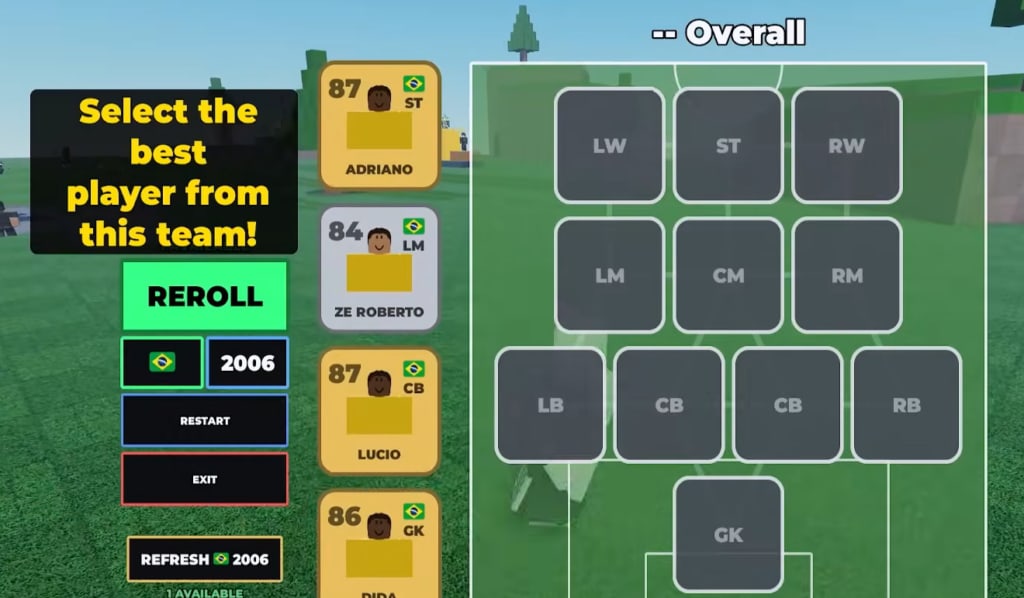
Build A Football Team runs on Roblox for PC, mobile, and console. There is no separate football sim with analog sprint. You tap lobby buttons, roll a country and a year, pick one card, and park it on a 4-3-3. This page is where those buttons sit after the CONSOLE patch, what Auto Reveal actually skips, and why a DualSense does not change chemistry. The official listing is still Build A Soccer Squad by Bloxheed, place 82524183928567, live Early Beta, 25-player lobby.
If you have not redeemed codes or filled eleven slots, start with getting started and how to play. This page does not replace those. It answers the device questions those pages only mention.
The loop does not change with the controller
On PC you click. On a phone you tap. On Xbox or PlayStation you highlight and confirm through the Roblox app. The verbs stay:
- Finish the intro tutorial. The CODES button stays off the HUD until that scripted sequence ends — how to redeem.
- Open Build Your Squad. The game locks a nation and a year stamp (1970–today, plus later 2030 tags).
- Pick one card from the offer.
- Place it on LW, ST, RW / the mid line / LB, two CBs, RB / GK.
- Refresh to reshuffle the same country-year, or Reroll to leave it. Currency rules: Rerolls and Refreshes.
- Save the eleven. Check Squad OVR with chemistry counted. Hunt leaks with the OVR checklist.
Console support did not add split-screen. Cup Mode is still a simulated 3D knockout you enter from the lobby at 93 OVR. Other managers share the plaza; they are not on your couch.
Where the HUD sits (all devices)
Bottom-right stack: CODES, Rewards, Quests. CODES is the one people miss on phones because a thumb covers it. Rewards is the 2026 nation grid for captains. Quests starts the timers in how to farm, including the long 8-hour stay-in-server loop the CONSOLE-era patch leaned on.
Shops: Coin Shop (specific faces for coins) and Hourly Shop (Prime 100+ rotation). Open them with the same tap on every device. Do not bind a custom key hoping Roblox will map it — the experience uses its own buttons, not WASD football.
Pitch: Build Your Squad is the 4-3-3 board. Drag or confirm onto a slot. Empty slots tank chemistry. Natural position still matters if you play with a stick or a finger.
Cup portal / leaderboard: usually opposite the shop stack. Grey until 93 OVR including chemistry. The squad locks for the tournament; you cannot hot-swap mid-bracket from a controller any more than from a mouse.
Live promo strings still include CONSOLE (25 Rerolls and 25 Refreshes on this wiki, matching LIMITBREAKER). The name marks the drop, not a platform lock. PC and mobile redeem it too. Full list: codes hub.
Auto Reveal and other paid skips
The console-era patch shipped an Auto Reveal style game pass (community price reports sit around 500 Robux). It skips the four-card flip animation so grinding is faster. It does not change pack odds. It does not raise chemistry. It does not complete a 2026 grid. Buy it only if you already know the roll loop from how to play and you are burning hours on reveals, not if you still mis-tap Refresh.
No control scheme on any device lets you hide an executor. Scripts remain against Roblox Terms of Use. A game pass is a legal skip. A loader is not.
The mid-article video walks the console support drop: Auto Reveal, the long quest, and extra Limitbreaker noise from that week. Use it to see the menus. Use this page so you do not think Xbox unlocked a different formation.
Mobile and console traps
Tutorial gate. You cannot skip it by rejoining on another device. The CODES button stays hidden until the intro finishes on that account.
Fat-finger Refresh. On a phone, Refresh and Reroll sit close. Refresh keeps the country. Reroll leaves it. If you are collecting Brazil 2026 for a captain, a mis-tap Reroll dumps the pool. Put the phone in landscape if the buttons collide.
AFK quests on console. The 8-hour quest wants one server. Dashboarding Roblox, switching games, or letting the console sleep is the same as leaving on PC: progress reports reset. Stay in the 25-player lobby. The plaza walk is enough anti-idle for most sessions; you do not need to “play football” on the sticks.
Text size. Code strings are ALL CAPS and case-sensitive. Paste from this wiki instead of typing CONSOLE with a letter missing. How to redeem is the tap order if the on-screen keyboard covers the submit control.
After you know the buttons, stop reading controls. Fill the eleven, paint chemistry green, and spend Hourly Shop coins only on the leak the team planner named. Patch tags — CONSOLE, 2030, GOAT XI — add pools and passes. They do not add a second control scheme. Official links: links hub.
Frequently Asked Questions
Quick answers to the most common squad-building questions.
Does Build A Football Team play differently on console?
No. PC, mobile, and console share the same roll-pick-slot loop in a 25-player lobby. Console support added a client and code CONSOLE, not a new formation.
Where is the Codes button on mobile?
Bottom-right of the lobby after the tutorial, in the stack with Rewards and Quests. A thumb can hide it in portrait. Full steps: how to redeem.
What does Auto Reveal do?
It skips the four-card flip animation. It does not change odds, chemistry, or captain unlocks. It is a time skip, not a strength skip.
Can I play Cup Mode in local split-screen?
No. Cup Mode is a simulated tournament from the lobby at 93 OVR. Other players share the online plaza, not your couch.
Does CONSOLE only redeem on Xbox or PlayStation?
No. PC and mobile can redeem CONSOLE too. The name marks the console-support drop. This wiki lists 25 Rerolls and 25 Refreshes.